library(paneldesc)5 Extended example
Typically, package functions include multiple arguments, the different values of which allow for flexible configuration. Below are various examples demonstrating the package’s customization potential.
5.1 Set up
Import the package.
5.2 Data import
Import the built-in dataset with simulated unbalanced panel data.
data(production)Set up a panel structure in advance so that you don’t have to do it later each time you use other functions. Note that if delta is supplied, the function checks for omitted time periods. If such periods exist, they will be taken into account when other functions work with this argument.
panel <- make_panel(production, index = c("firm", "year"), delta = 1)5.3 Panel data structure analysis
If necessary, you can display more detailed statistics on the distribution of entities by periods and periods by entities.
describe_balance(panel, detail = TRUE, digits = 2)| dimension | mean | std | min | p5 | p25 | p50 | p75 | p95 | max |
|---|---|---|---|---|---|---|---|---|---|
| entities | 26.17 | 3.97 | 19 | 20.5 | 25.25 | 27 | 28.75 | 29.75 | 30 |
| periods | 5.23 | 0.94 | 3 | 4.0 | 4.25 | 6 | 6.00 | 6.00 | 6 |
plot_periods() function allows to customize colors.
plot_periods(panel, colors = c("gray", "black"))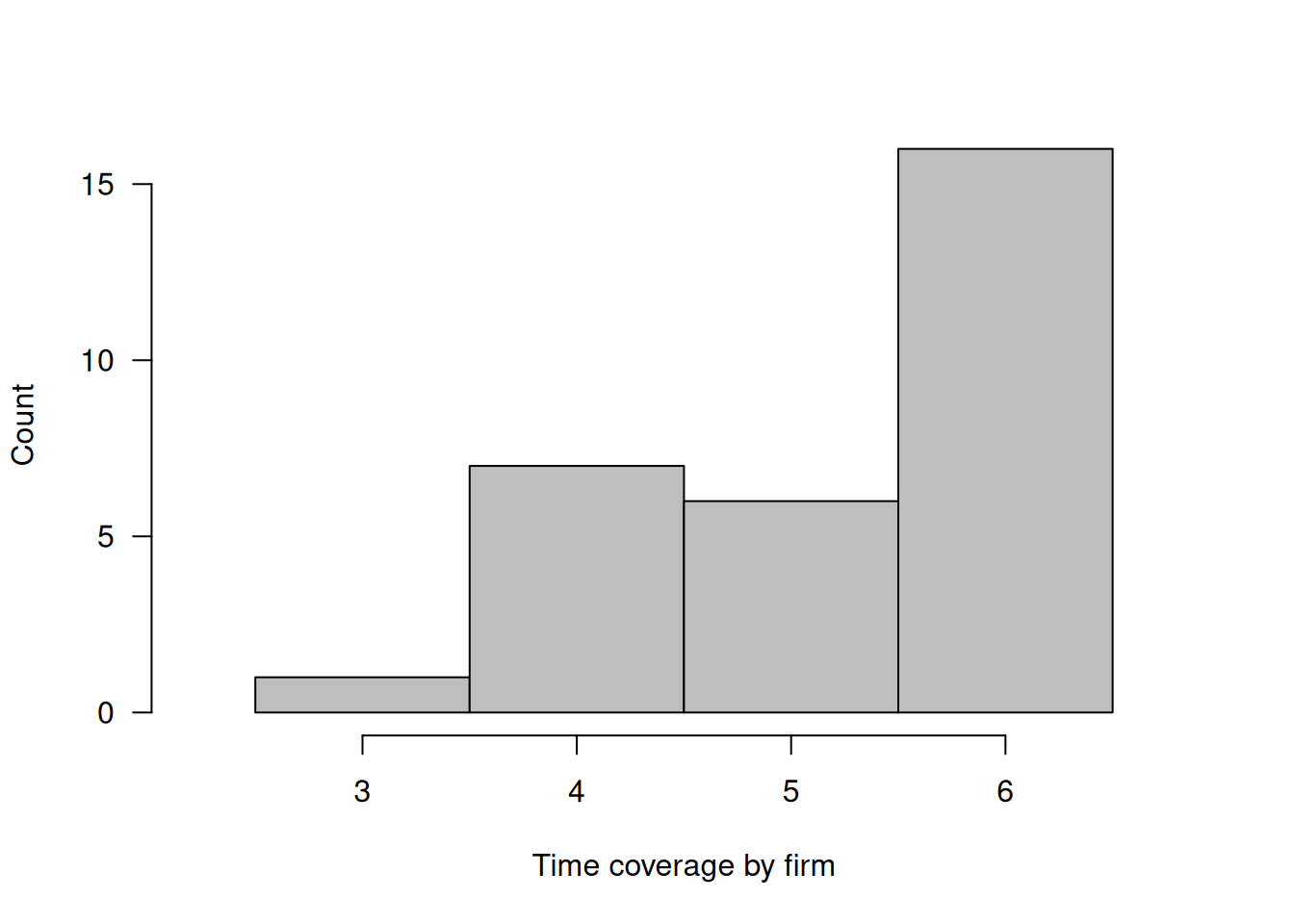
Both describe_patterns() and plot_patterns() allow you to limit the range of patterns to display. In addition, desribe_patterns() allows to customize rounding when calculting shares, while plot_patterns() allows to customize colors.
describe_patterns(panel, limits = 3, digits = 2)| pattern | 1 | 2 | 3 | 4 | 5 | 6 | count | share |
|---|---|---|---|---|---|---|---|---|
| 1 | 1 | 1 | 1 | 1 | 1 | 1 | 16 | 0.53 |
| 2 | 1 | 1 | 1 | 1 | 1 | 0 | 5 | 0.17 |
| 3 | 1 | 1 | 1 | 1 | 0 | 0 | 3 | 0.10 |
plot_patterns(panel, limits = c(4, 6), colors = c("darkgray", "white"))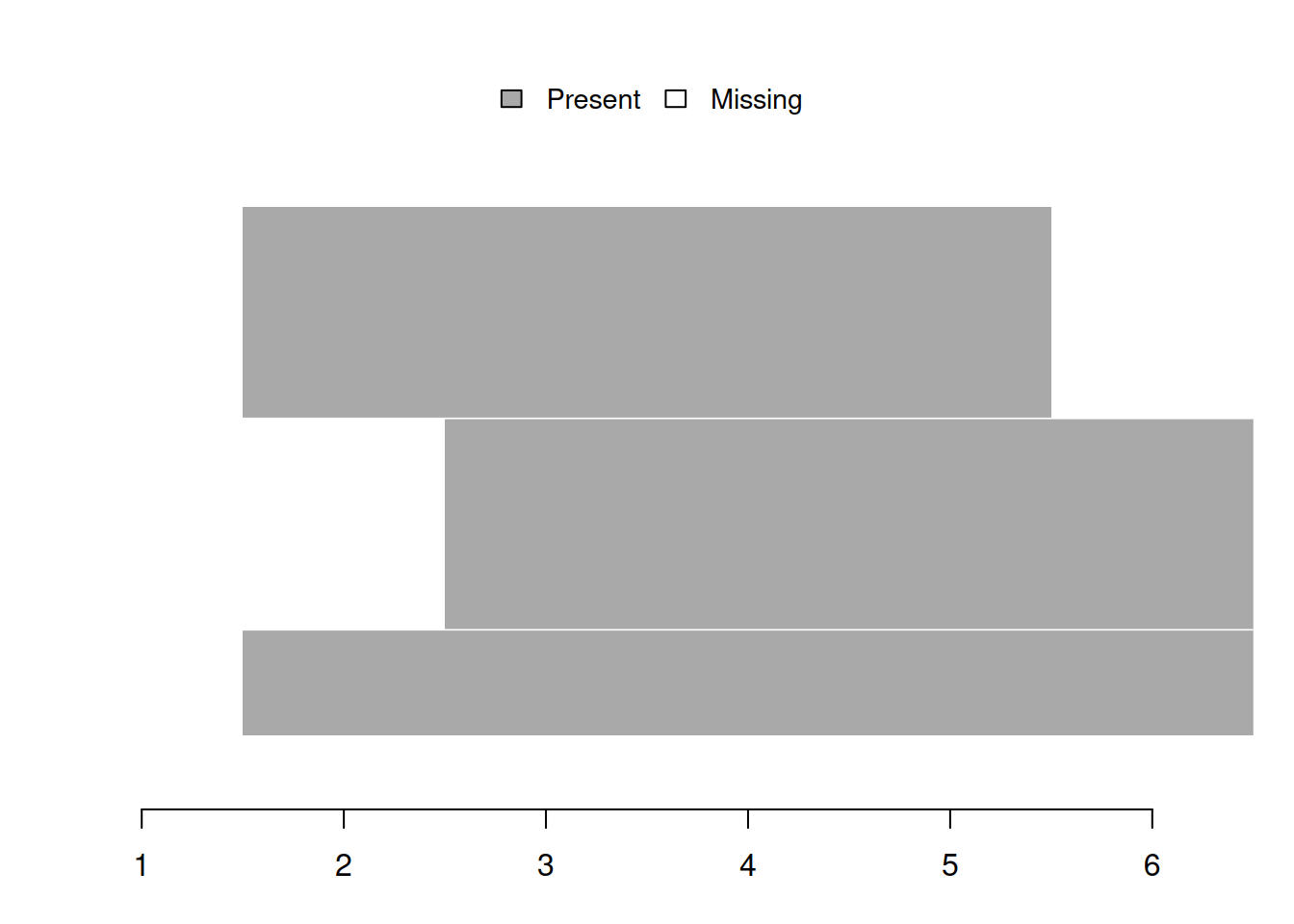
5.4 Missing values analysis
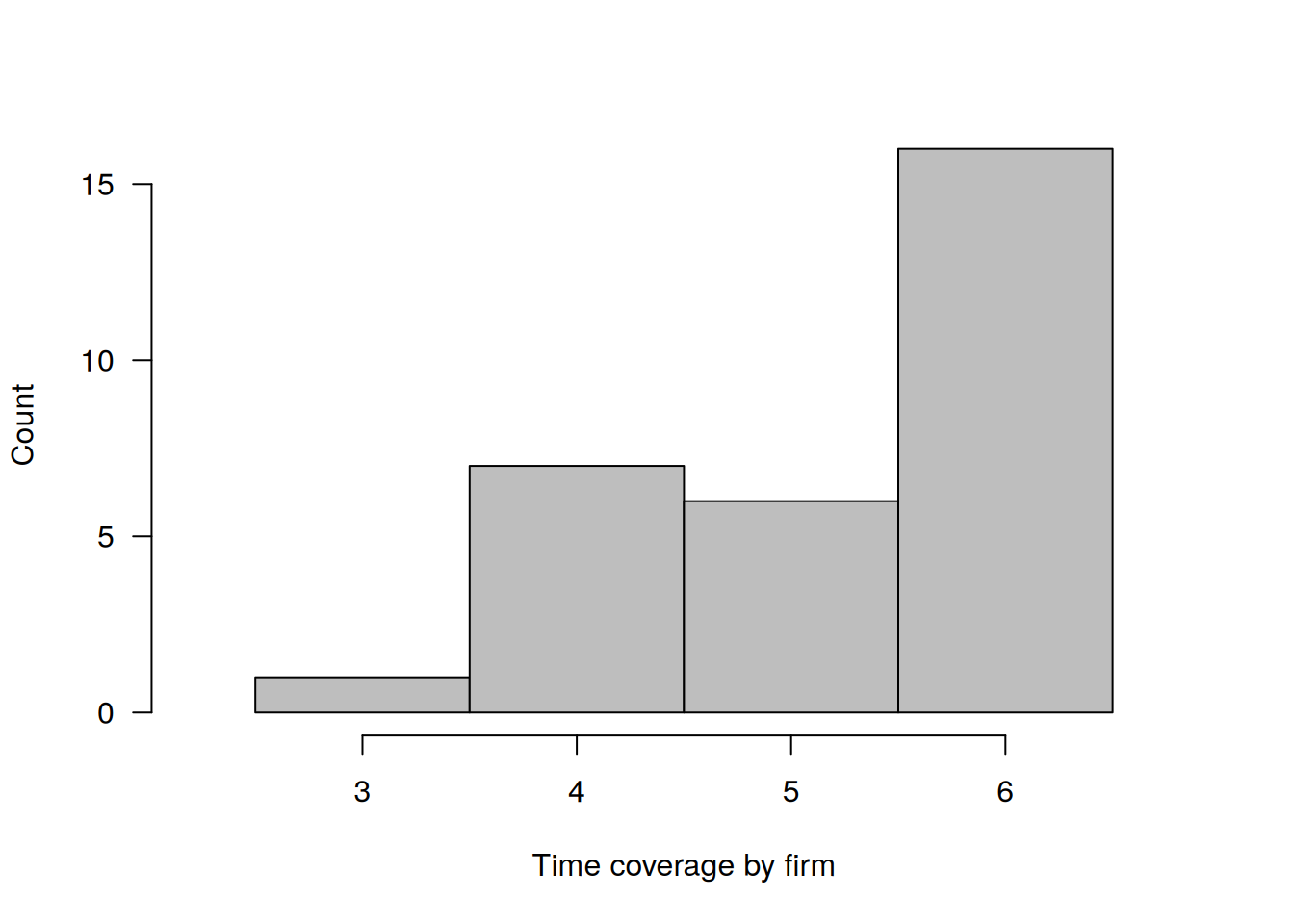
plot_missing() allows to select specific variables to analyze. One can also customize colors.
plot_missing(
  panel,
  select = c("labor", "capital"),
  colors = c("black", "white")
)
summarize_missing() also allows to select specific variables to analyze. In addition, it can provide more detailed table by adding period-specific missing value counts. One can also customize rounding.
summarize_missing(
  panel,
  select = c("labor", "capital"),
  detail = TRUE,
  digits = 2
)| variable | na_count | na_share | entities | periods | 1 | 2 | 3 | 4 | 5 | 6 |
|---|---|---|---|---|---|---|---|---|---|---|
| labor | 26 | 0.14 | 15 | 6 | 6 | 2 | 1 | 1 | 5 | 11 |
| capital | 26 | 0.14 | 17 | 6 | 5 | 2 | 2 | 2 | 4 | 11 |
describe_incomplete() can provide more detailed table by adding variable-specific missing value counts.
describe_incomplete(panel, detail = TRUE)| firm | na_count | variables | sales | capital | labor | industry | ownership | region |
|---|---|---|---|---|---|---|---|---|
| 23 | 18 | 6 | 3 | 3 | 3 | 3 | 3 | 3 |
| 6 | 13 | 6 | 2 | 2 | 3 | 2 | 2 | 2 |
| 7 | 13 | 6 | 3 | 2 | 2 | 2 | 2 | 2 |
| 1 | 12 | 6 | 2 | 2 | 2 | 2 | 2 | 2 |
| 2 | 12 | 6 | 2 | 2 | 2 | 2 | 2 | 2 |
| 12 | 12 | 6 | 2 | 2 | 2 | 2 | 2 | 2 |
| 21 | 12 | 6 | 2 | 2 | 2 | 2 | 2 | 2 |
| 26 | 12 | 6 | 2 | 2 | 2 | 2 | 2 | 2 |
| 25 | 7 | 6 | 1 | 1 | 2 | 1 | 1 | 1 |
| 30 | 7 | 6 | 2 | 1 | 1 | 1 | 1 | 1 |
| 4 | 6 | 6 | 1 | 1 | 1 | 1 | 1 | 1 |
| 13 | 6 | 6 | 1 | 1 | 1 | 1 | 1 | 1 |
| 17 | 6 | 6 | 1 | 1 | 1 | 1 | 1 | 1 |
| 29 | 6 | 6 | 1 | 1 | 1 | 1 | 1 | 1 |
| 14 | 2 | 2 | 1 | 0 | 1 | 0 | 0 | 0 |
| 10 | 1 | 1 | 0 | 1 | 0 | 0 | 0 | 0 |
| 22 | 1 | 1 | 0 | 1 | 0 | 0 | 0 | 0 |
| 27 | 1 | 1 | 0 | 1 | 0 | 0 | 0 | 0 |
5.5 Numeric variables analysis
summarize_numeric() allows to select specific variables to analyze. It also can provide additional statisitcs. Custom rounding is also available.
summarize_numeric(
  panel,
  select = c("sales", "labor"),
  group = "year",
  detail = TRUE,
  digits = 2
)| year | variable | count | mean | std | min | p25 | p50 | p75 | max |
|---|---|---|---|---|---|---|---|---|---|
| 1 | sales | 25 | 72.30 | 43.04 | 12.00 | 44.77 | 70.21 | 89.97 | 192.59 |
| 1 | labor | 24 | 74.35 | 69.77 | 18.41 | 32.64 | 58.58 | 76.74 | 333.38 |
| 2 | sales | 28 | 67.56 | 35.06 | 20.37 | 40.72 | 64.69 | 90.57 | 150.74 |
| 2 | labor | 28 | 81.76 | 66.57 | 17.67 | 37.43 | 66.14 | 89.84 | 327.58 |
| 3 | sales | 29 | 72.09 | 64.52 | 17.32 | 33.49 | 46.72 | 80.69 | 292.85 |
| 3 | labor | 29 | 82.26 | 106.87 | 8.17 | 31.73 | 57.19 | 91.43 | 579.02 |
| 4 | sales | 27 | 56.86 | 31.71 | 12.00 | 36.25 | 48.24 | 67.06 | 136.69 |
| 4 | labor | 29 | 55.53 | 46.45 | 5.97 | 26.86 | 40.51 | 61.74 | 207.57 |
| 5 | sales | 26 | 62.16 | 41.24 | 19.77 | 33.57 | 49.30 | 69.85 | 189.07 |
| 5 | labor | 25 | 74.06 | 71.26 | 15.88 | 32.17 | 49.53 | 87.45 | 266.83 |
| 6 | sales | 19 | 83.83 | 45.56 | 25.99 | 46.48 | 78.38 | 115.12 | 191.59 |
| 6 | labor | 19 | 101.00 | 67.26 | 18.67 | 48.59 | 79.96 | 130.89 | 259.85 |
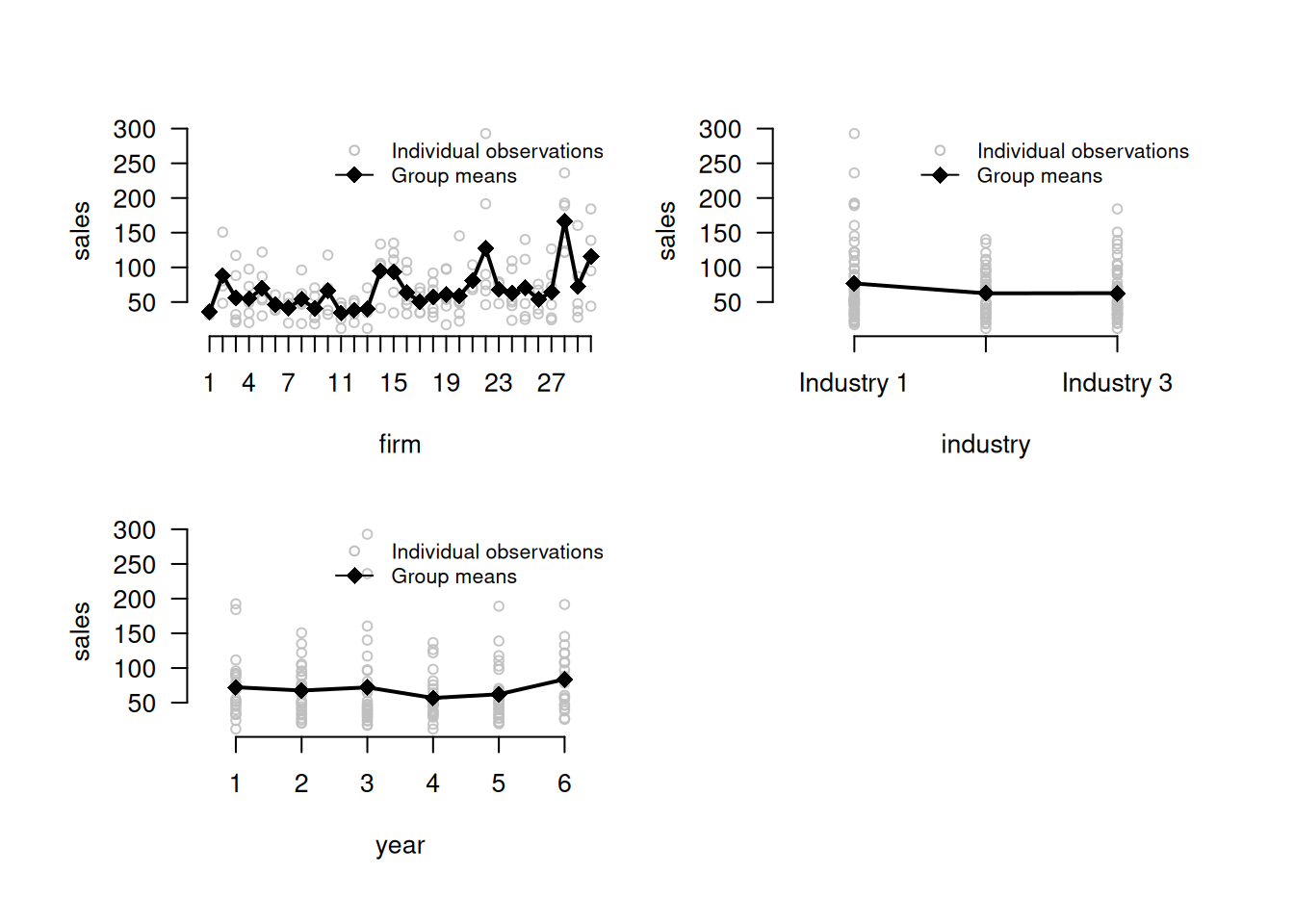
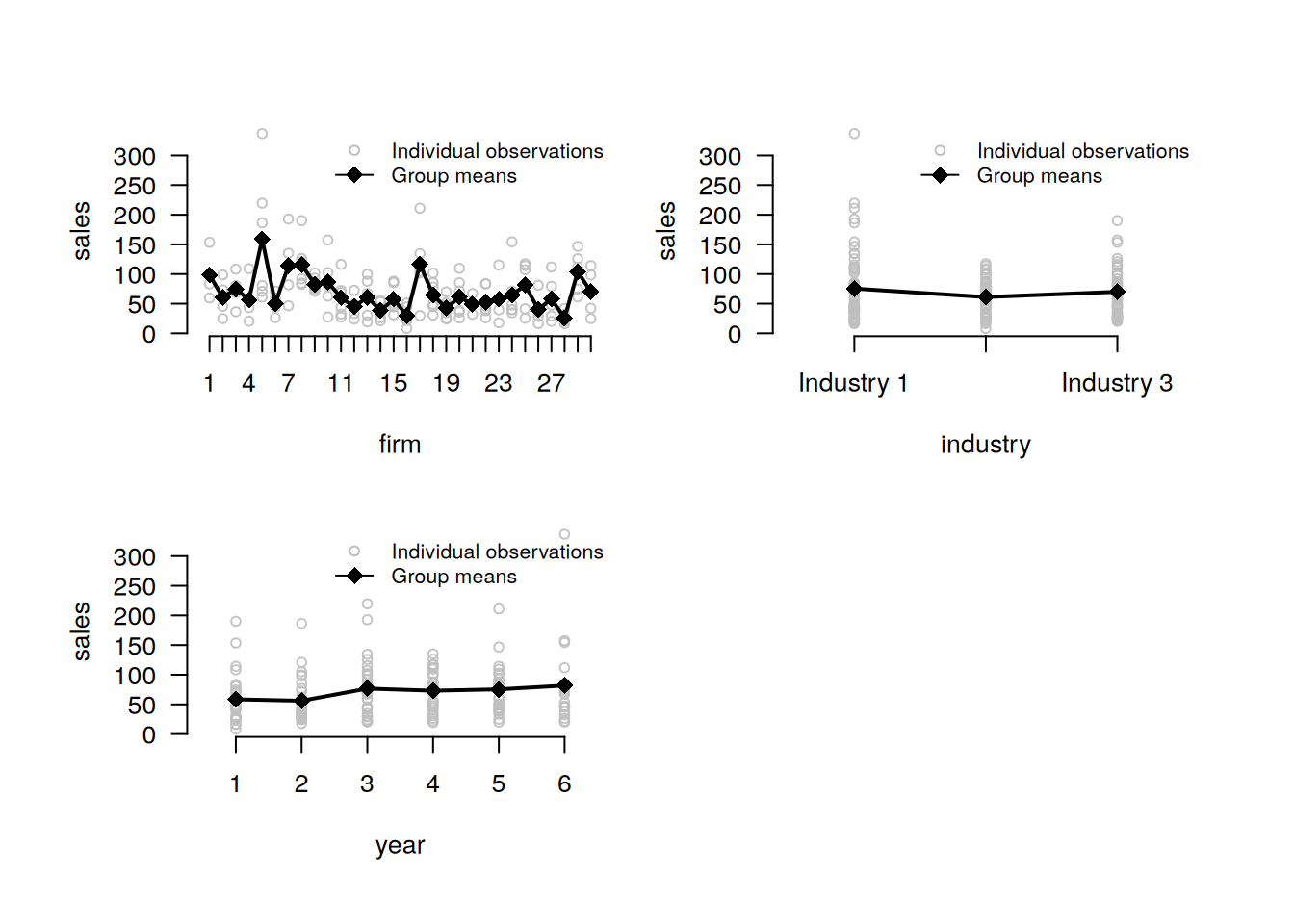
plot_heterogeneity() allows to choose several grouping variables. One can also customize colors.
plot_heterogeneity(
  panel,
  select = "sales",
  group = c("firm", "industry", "year"),
  colors = c("black", "gray")
)
decompose_numeric() allows to select specific varibles to analyze. One also can output the resulting table in wide format and hide redundant details, as well as customize rounding.
decompose_numeric(
  panel,
  select = c("sales", "labor"),
  detail = FALSE,
  format = "wide",
  digits = 2
)| variable | mean | std_overall | std_between | std_within |
|---|---|---|---|---|
| sales | 68.40 | 45.02 | 29.06 | 34.13 |
| labor | 76.88 | 74.15 | 41.07 | 61.20 |
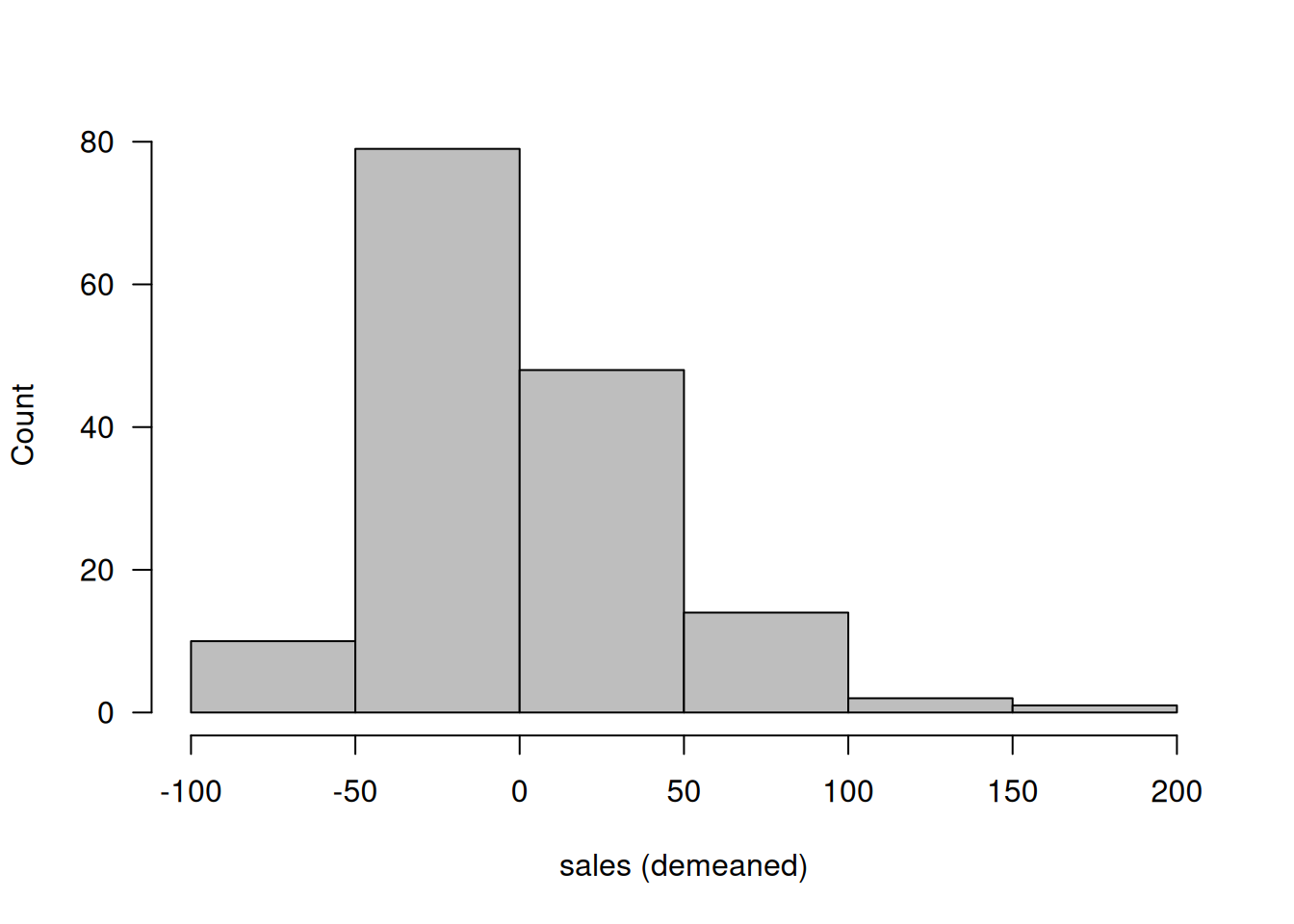
plot_demeaned() allows to choose several grouping variables. One can also customize colors.
plot_demeaned(
  production,
  select = "sales",
  group = c("industry", "region", "year"),
  colors = c("gray", "black")
)
plot_demeaned(
  production,
  select = c("labor", "sales"),
  group = c("industry", "region", "year"),
  colors = c("gray", "black")
)
5.6 Factor variables analysis
Compared to the default settings, both decompose_factor() and summarize_transition() functions can output the resulting table in long format and also allow to customize rounding. descompose_factor() also allows to select specific variables to analyze.
decompose_factor(panel, select = "industry", format = "long", digits = 2)| variable | category | dimension | count | share |
|---|---|---|---|---|
| industry | Industry 1 | between | 13 | 0.43 |
| industry | Industry 2 | between | 11 | 0.37 |
| industry | Industry 3 | between | 10 | 0.33 |
| industry | Industry 1 | overall | 63 | 0.40 |
| industry | Industry 2 | overall | 45 | 0.29 |
| industry | Industry 3 | overall | 49 | 0.31 |
| industry | Industry 1 | within | NA | 0.92 |
| industry | Industry 2 | within | NA | 0.81 |
| industry | Industry 3 | within | NA | 0.92 |
summarize_transition(panel, select = "industry", format = "long", digits = 2)23 rows with NA values in 'industry' removed.| from | to | count | share |
|---|---|---|---|
| Industry 1 | Industry 1 | 50 | 1.00 |
| Industry 1 | Industry 2 | 0 | 0.00 |
| Industry 1 | Industry 3 | 0 | 0.00 |
| Industry 2 | Industry 1 | 2 | 0.05 |
| Industry 2 | Industry 2 | 34 | 0.92 |
| Industry 2 | Industry 3 | 1 | 0.03 |
| Industry 3 | Industry 1 | 0 | 0.00 |
| Industry 3 | Industry 2 | 1 | 0.03 |
| Industry 3 | Industry 3 | 39 | 0.98 |